How to Design an Employee ID Badge: Best Practices, Security Dos and Don'ts
The complete guide to designing a badge that identifies, protects, and performs.
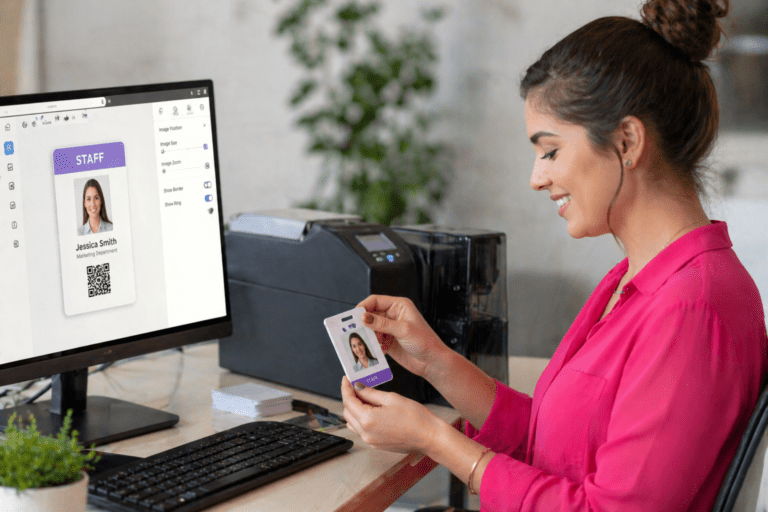
Your employee ID badge does more than identify who someone is. It determines where they can go, signals whether they belong, and, if poorly designed, hands an attacker a ready-made tool for social engineering, impersonation, or unauthorized access.
Most organizations think about badge design from the front end: logo placement, colour scheme, and photo size. Far fewer think about it from a security perspective — what information the badge reveals, what features make it tamper-resistant, and what design decisions create vulnerabilities that training and policy alone cannot fix.
This guide covers both. Here is everything you need to design an employee ID badge that looks professional, functions reliably, and is secure.
The Essential Elements of an Effective Badge Design
A well-designed badge clearly communicates identity, supports your access control system, and minimizes the information available to anyone who should not have it. Start with these core elements:
Employee Photo
The photo is your most important visual verification tool. It should be high-resolution, recent, and large enough to be identifiable at a glance — not a thumbnail that requires squinting. A clear, current photo allows security personnel, colleagues, and reception staff to quickly confirm that the person wearing the badge is the person on the badge.
Employee Name
First name and last name are standard, but consider whether your environment warrants first name only for higher-risk roles or public-facing positions. In environments where employees regularly interact with the public, a full name on the badge increases exposure to social engineering and targeted harassment.
Role or Job Title (Used Carefully)
A job title can support rapid role identification in an emergency and help visitors understand whom to approach. However, highly specific titles (particularly those indicating seniority, IT access, or financial authority) are useful intelligence for social engineers. Consider using role categories rather than exact titles where security warrants it.
Company Logo and Branding
Your logo and brand colours establish legitimacy and make it easy to identify an employee as belonging to your organization. Keep the design clean and consistent — a badge that looks professional is harder to dismiss as suspicious than one that looks homemade.
Access Credential (Encoded)
The encoded credential — whether RFID, smart chip, barcode, or QR code — is what controls access. This is the functional core of the badge. It should be present on every employee badge and paired with your access control system for logging, auditing, and instant deactivation capability.
Badge Design: Dos and Don'ts
✅ DO | ❌ DON’T |
• Use a high-resolution, recent employee photo — large enough to identify at a glance | • Print your office address or building location on the badge face |
• Apply colour coding by department, role, or access zone — consistently enforced | • Include department names that reveal sensitive internal structure (e.g., ‘IT Security’, ‘Executive Suite’) |
• Include an encoded credential (RFID, smart chip, or barcode) tied to your access control system | • Use the same badge design for employees and visitors — they must be visually distinct at first glance. |
• Add covert security features: UV printing, holographic overlays, microtext | • Laminate over a direct-to-card print and assume it is tamper-proof — it is not |
• Use retransfer printing for tamper-evident, durable, edge-to-edge card quality | • Post photos of new employees on social media with the badge visible |
• Keep the badge design clean and consistent — professional appearance matters | • Print personal information beyond what is necessary (e.g., employee ID numbers that double as payroll identifiers) |
• Include only the minimum identifying information needed for the badge’s function | • Use generic, easy-to-replicate designs with no overt or covert security features |
• Use a unique employee ID number rather than exposing internal system identifiers | • Treat the badge as purely decorative — every design decision has a security implication |
• Match badge design to the environment: industrial badges need rugged materials | • Ignore the back of the badge — it is usable space for encoded data and secondary security features |
• Build in immediate visual evidence of tampering — any alteration should be obvious | • Allow badge designs to go unchanged for years — review and refresh periodically |
Colour Coding: Simple, Visible, and Powerful
Colour coding is one of the most underused tools in badge design. Applied consistently, it gives every person in your facility — not just security staff — an immediate, visual way to identify whether someone belongs in a particular area.
How to Use Colour Coding Effectively
Assign distinct badge colours or colour accents to different access tiers, departments, or zones. Common approaches include:
- Full badge background colour by department or division
- Coloured border or stripe indicating access level (general, restricted, executive, visitor)
- Coloured lanyard paired with badge design for reinforced visual identification
- Contractor and visitor badges in high-visibility colours distinct from all employee badge colours
The key rule: colour coding only works if it is enforced consistently and every employee understands the system. A colour-coded badge program without training is just decoration. With training, it becomes an active, human-layer access control mechanism.
Security Features Worth Building In
The printed design of your badge is the first line of defence. The following features (available through professional card printing technology) make your badge significantly harder to replicate or alter.
Retransfer Printing
Retransfer printing produces a full-bleed, edge-to-edge image by printing first onto a clear film, which is then thermally fused to the card surface. The result is a badge with superior image quality, increased durability, and a tamper-evident surface: any attempt to peel, alter, or modify the badge permanently destroys the image. This is your most important physical security feature.
UV-Invisible Printing
Text or imagery printed with UV (ultraviolet) ink is completely invisible under normal lighting and only revealed under a UV light source. This hidden layer can include employee identifiers, authentication codes, or organizational marks — and is beyond the detection capability of most would-be forgers.
Holographic Overlays and Laminates
Holographic laminate applied over the printed badge creates a shimmering security layer that is extremely difficult to replicate with standard equipment. It also adds durability, protecting the card surface from daily wear. Most forgers will not attempt to replicate a holographic laminate — and those who do will produce a result that is visibly inferior under normal scrutiny.
Microtext and Watermarks
Microtext (tiny, printed text visible only under magnification) and embedded watermarks add covert verification layers that are invisible during normal use but immediately apparent to trained security personnel conducting a close inspection. These features are particularly valuable in high-security environments where badge verification is a routine checkpoint.
Encoded Credentials
Barcodes, QR codes, RFID chips, and smart cards embed a digital identity layer that must match your access control system’s records for access to be granted. A visually convincing fake badge that fails to read is useless. Always pair physical badge design with encoded, system-verified credentials.
Visitor and Contractor Badges: The Rules Are Different
Visitor and contractor badges are one of the most common security gaps in otherwise well-designed badge programs. The principles are straightforward:
- Visitor badges must be visually distinct from employee badges — instantly, immediately, from across a room. Use different colours, designs, or formats that cannot be confused with a legitimate employee credential.
- Time-limit visitor badges explicitly. A badge valid for one day should be visually distinguishable from one valid for a week, and your access control system should automatically deactivate both at expiry.
- Escort visitors in high-security areas. No badge design substitutes for a human escort in areas where the consequences of unauthorized access are severe.
- Never issue visitor badges that resemble employee badges in colour, format, or branding. The whole point is immediate visual differentiation.
Match the Badge to the Environment
Badge design is not one-size-fits-all. The right design for a corporate office is different from that for a hospital, a construction site, or a warehouse floor.
Corporate and Office Environments
Clean, professional design. High-quality photo. Encoded access credential. Colour-coded by department or access level. Retransfer-printed for tamper evidence and durability.
Healthcare and Clinical Settings
Role clearly indicated (clinical, administrative, contractor, visitor). Hygienic materials that withstand regular sanitization. Colour zoning for access-restricted clinical areas. Visitor badges in high-visibility colours distinct from all staff credentials.
Industrial, Manufacturing, and Warehouse Environments
Industrial-grade card materials that resist moisture, heat, solvents, and physical abrasion. Breakaway lanyards are mandatory. Large, high-contrast design for readability at a distance. Zone-based colour coding for hazardous or restricted areas.
Construction and Trades
Rugged card stock. Minimal surface detail that will survive job site conditions. Role and certification tier clearly indicated. Temporary credentials for subcontractors visually distinct from permanent staff.
Table of Contents
Centralized vs. Decentralized Badge Printing for Healthcare
Centralized vs. Decentralized Badge Printing in Healthcare? Let Someone Else Handle It. Let’s be real for a second. If you’re managing a hospital department, a
5 Must-Have Features for Trades ID Badges
5 Must-Have Features for Trades ID Badges That Actually Work on Site Forget flimsy paper badges or faded clips. On a busy job site, your
Centralized vs. Decentralized Badge Printing
Centralized vs. Decentralized Badge Printing: Which One Actually Fits Your Team? Let’s be honest: the last thing you want is an ID badge system that
QR Code Badges: Your Pocket Digital Workstation
Stop Your ID Badge from Being Lazy: Turn It Into a Digital Workstation Let’s be real. Your employee badge has one job: get you through
Unified Healthcare IDs: A Compliance Framework
How to Manage Badge Compliance for Staff, Residents, and Visitors Without the Headache If you manage badges in a healthcare or LTC setting, you know
PVC vs. Polyester vs. Generic Plastic ID Badges
PVC vs Polyester vs. Cheap Plastic: A No-Nonsense Guide to Badges That Won’t Quit on You Let’s be real: your average employee ID badge has